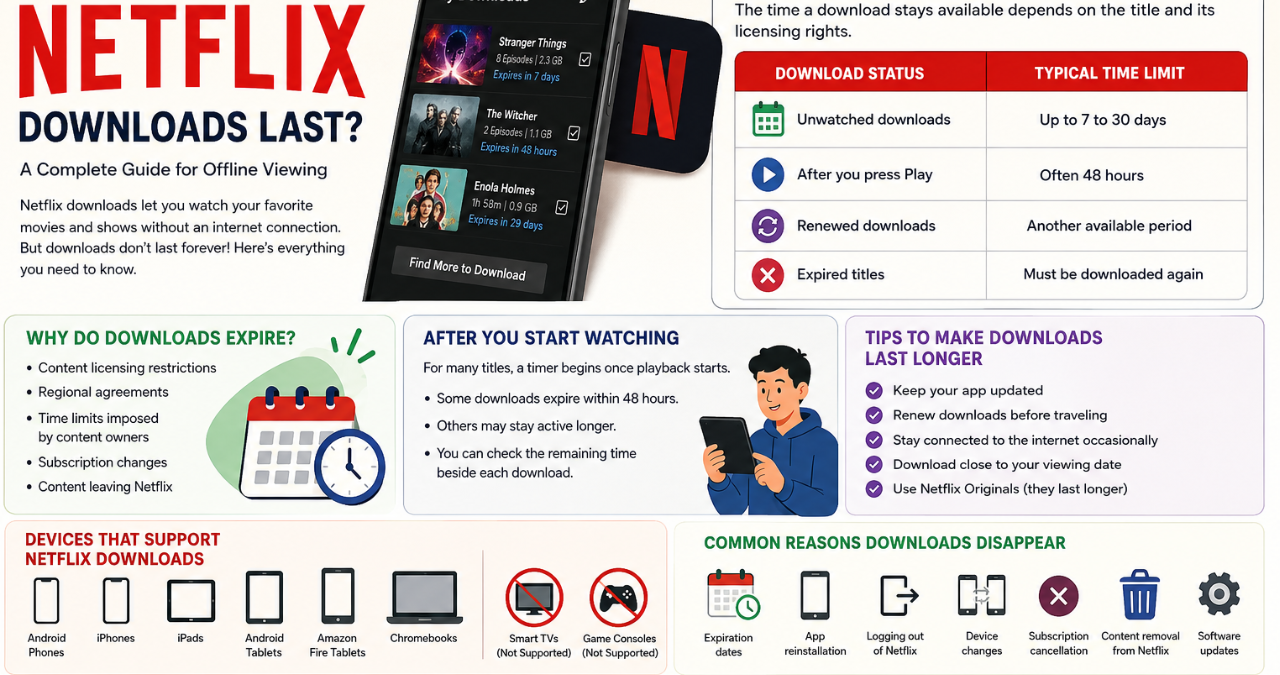

How long do netflix downloads last? That’s one of the most common questions people ask when they download movies and TV shows for offline viewing. After all, nobody wants to prepare for a long flight or road trip only to find out that their downloaded content has disappeared.
Thankfully, Netflix makes it easy to enjoy entertainment without an internet connection. However, downloads aren’t permanent. They come with certain rules, expiration dates, and viewing limits that every user should understand.
In this detailed guide, you’ll learn everything about Netflix downloads, how long they stay available, what causes them to expire, and how to keep enjoying your favorite content without surprises.
Understanding Netflix Downloads
Netflix allows subscribers to save selected movies and TV episodes directly to their devices. This feature is especially useful when traveling or when internet access isn’t available.
Downloaded content can be viewed on:
- Smartphones
- Tablets
- iPhones and iPads
- Android devices
- Amazon Fire tablets
- Some Chromebooks
Not every title is available for download because licensing agreements vary from one show or movie to another.
How Long Do Netflix Downloads Last?
Many people wonder, how long do netflix downloads last after they have been saved. The answer depends on the title and its licensing rights.
Generally:
| Download Status | Typical Time Limit |
|---|---|
| Unwatched downloads | Up to 7 to 30 days |
| Titles with shorter licenses | 48 hours after pressing Play |
| Renewed downloads | Another available period |
| Expired titles | Must be downloaded again |
Some titles remain available for several weeks, while others may expire just two days after viewing begins.
Because each title has different rights, Netflix doesn’t provide one universal expiration period.
Why Do Netflix Downloads Expire?
Well, here’s the thing—Netflix doesn’t own every movie and series available on the platform. Licensing agreements with studios and production companies determine how long content can remain downloadable.
Downloads may expire because of:
- Content licensing restrictions.
- Regional agreements.
- Time limits imposed by content owners.
- Subscription changes.
- Content leaving Netflix.
These rules help Netflix manage agreements with entertainment companies worldwide.
What Happens After You Start Watching?
Another common question is how long do netflix downloads last after you’ve already started watching them.
For many titles:
- A timer begins once playback starts.
- Some downloads expire within 48 hours.
- Others may stay active longer.
- Once expired, the content becomes unavailable until renewed.
You can easily check the remaining time beside each downloaded title inside the Netflix app.
How to Check Download Expiration Dates
Thankfully, Netflix makes things pretty simple.
Follow these steps:
Open the Netflix App
Launch the application on your device.
Go to Downloads
Tap the “My Netflix” section and select “Downloads.”
Look for Expiration Information
Titles nearing expiration display messages such as:
- “Expires in 7 days”
- “Expires tomorrow”
- “Expires in 48 hours”
Renew If Available
If the title still supports downloads, simply tap the renewal icon.
Easy peasy!
Factors That Affect Download Duration
If you’re asking yourself, how long do netflix downloads last, several factors come into play.
Licensing Agreements
Studios decide how long their content may remain downloadable.
Geographic Location
Availability differs from country to country.
Type of Content
Netflix Originals usually stay available longer than licensed titles.
Device Storage
Limited storage can affect how many downloads you keep.
Subscription Status
An active subscription is required to access downloaded titles.
Netflix Originals vs Licensed Content
Not all downloads behave the same way.
Netflix Originals
These usually offer:
- Longer download periods.
- Easier renewal options.
- Better availability worldwide.
Examples include:
- Stranger Things
- Wednesday
- Squid Game
- Bridgerton
Licensed Movies and Shows
These titles often:
- Have shorter expiration periods.
- May disappear without notice.
- Depend heavily on studio contracts.
That’s why two downloads may have completely different expiration dates.
Can Expired Downloads Be Renewed?
Good news—many expired downloads can be renewed.
Here’s how:
- Connect to the internet.
- Open Netflix.
- Visit Downloads.
- Find the expired title.
- Tap the renew icon.
However, renewal isn’t always possible.
Renewal may fail if:
- The title has left Netflix.
- Download limits have been reached.
- Licensing agreements have ended.
- Your subscription has expired.
Download Limits You Should Know
Besides wondering how long do netflix downloads last, users should understand download limits.
Netflix places restrictions on certain titles.
These limitations include:
- Maximum number of devices.
- Number of downloads per account.
- Annual download caps for some content.
- Device-specific restrictions.
When limits are reached, you’ll need to delete old downloads before adding new ones.
Tips to Make Netflix Downloads Last Longer
Nobody likes surprises. Fortunately, a few simple habits can help.
Keep Your App Updated
Updated apps often provide better download performance.
Renew Downloads Before Traveling
Check expiration dates before boarding a plane or heading on vacation.
Stay Connected Occasionally
Connecting to the internet allows Netflix to verify your subscription.
Download Close to Your Viewing Date
Fresh downloads usually provide the maximum available time.
Use Netflix Originals
These titles often remain available longer.
Common Reasons Downloads Disappear
Sometimes downloads vanish unexpectedly.
Possible causes include:
- Expiration dates.
- App reinstallation.
- Logging out of Netflix.
- Device changes.
- Subscription cancellation.
- Content removal from Netflix.
- Software updates.
If this happens, reconnect to the internet and download the title again if it’s still available.
Devices That Support Netflix Downloads
Netflix supports offline viewing on several devices.
| Device Type | Download Support |
|---|---|
| Android Phones | Yes |
| iPhones | Yes |
| iPads | Yes |
| Android Tablets | Yes |
| Amazon Fire Tablets | Yes |
| Chromebooks | Yes |
| Smart TVs | No |
| Game Consoles | No |
Portable devices remain the best option for offline entertainment.
Advantages of Downloading Content
Downloading movies and shows offers many benefits.
These include:
- No buffering.
- Watching without Wi-Fi.
- Saving mobile data.
- Great for travel.
- Better viewing during flights.
- Convenient entertainment anywhere.
No wonder millions of Netflix subscribers rely on this feature every day.
Frequently Asked Questions
Do Netflix Downloads Expire Automatically?
Yes. Every download has an expiration period determined by licensing agreements.
Can I Watch Expired Downloads Offline?
No. Expired titles must be renewed or downloaded again.
Why Do Some Downloads Expire Faster?
Different studios set different rules for their content.
Are Netflix Originals Permanent?
Not necessarily, but they often remain available longer than licensed content.
Can I Transfer Downloads Between Devices?
No. Downloads are tied to the device on which they were originally saved.
Do I Need Internet to Watch Downloads?
No. Internet is only required for verification and renewal.
Final Thoughts on How Long Do Netflix Downloads Last
So, how long do netflix downloads last? In most cases, downloads remain available for anywhere from a few days to several weeks. Some titles expire 48 hours after playback begins, while others can stay active for much longer.
Understanding expiration dates, licensing agreements, and renewal options can save you from disappointment. By checking your downloads regularly and renewing them when possible, you’ll enjoy smooth offline viewing wherever life takes you.
Whether you’re preparing for a vacation, a long commute, or simply relaxing at home, knowing how long do netflix downloads last helps you make the most of Netflix’s convenient offline feature.
Explore More: [dailymaghere.com]